Deploying a web api in 5 min on a linux machine
This is not a tutorial on how to deploy a application in a production environment.
Today I deployed an API and a LLM on an EC2 machine for a POC, a tiny api and ai model that run chat completion similarly to the OpenAI chat endpoint. They communicate together via GRPC. In this article, I’ll go through how to run the api, make it a daemon with systemd, install and setup nginx and configure SSL/TLS using Cloudflare.
I assume we have the web api (called app) in the $HOME folder, it is a simple binary and can be launched this way:
./app server --port 8080
systemd
We want to make sure that the app is always up and running and will be restarted in case of a crash or a system reboot. We’ll to use systemd. systemd is a system and service manager provided by the OS, we don’t need an extra dependency, that’s nice. Let’s configure systemd for the app. Create the following file /etc/systemd/system/app.service.
[Unit]
Description=My super web app
After=network.target

[Service]
ExecStart=/home/myuser/app server --port 8080
Restart=always
User=myuser
WorkingDirectory=/home/myuser/
StandardOutput=syslog
StandardError=syslog

[Install]
WantedBy=multi-user.target
Here we’re giving systemd all the required information to run the app. The most important one being ExecStart=/home/myuser/app server --port 8080 which is the command to start the app.
Let’s enable the service:
sudo systemctl enable app.service
This will enable the service. Under the hood, it creates a symlink to /etc/systemd/system/multi-user.target.wants/app.service. Even though the app will be launched at startup time, it won’t start right away, we still need to manually start it:
sudo systemctl start app.service
The app is now running in the background. For info, we can access the logs at /var/log/syslog:
tail -f /var/log/syslog
You should be able to see a line similar to this one:
systemd[1]: Started app.service - My super web app.
Cloudflare and SSL
We’re now to configure SSL and proxy the HTTP traffic through Cloudflare.
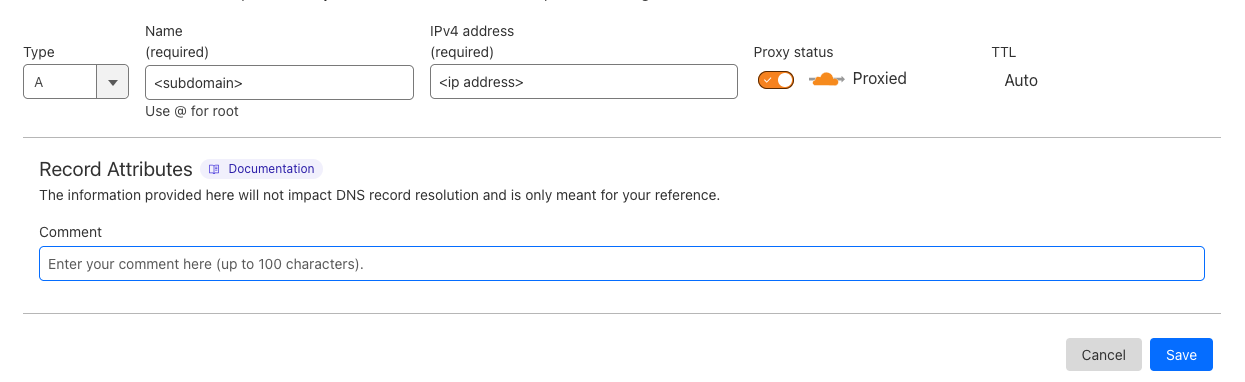
In the Cloudflare’s website, set the domain or subdomain to point to the public address IP of the machine. Let’s make sure that the HTTP traffic is proxied by checking the “Proxied” checkbox.
Now, click on the SSL/TLS tab in the right menu and then on Origin Server to create the certificates and key.
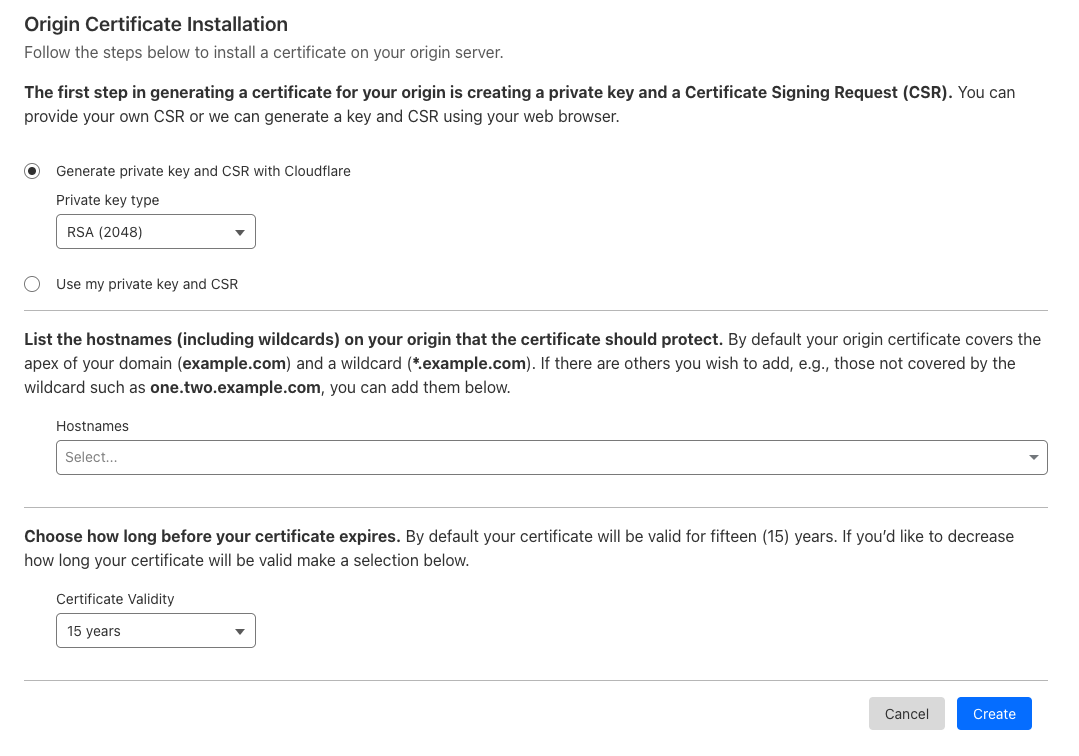 After the form submission, we get the certificate and the key that we’ll use for the nginx configuration.
That is it for Cloudflare, we now have our domain or subdomain pointing to the server’s IP address, the traffic proxied by Cloudflare and the ssl certificate and key.
After downloading the certificate and the key, store them on the server respectively in /etc/ssl/certs/my.domain.net.crt and /etc/ssl/private/my.domain.net.key. You can also put them wherever you want but it can lead to security issues… do what you want, I am not your mom.
Nginx
Now, let’s install nginx:
sudo apt update
sudo apt install nginx
Next we create a file (/etc/nginx/sites-available/my.domain.net) to tell to nginx to proxy the service for a given domain name.
sudo touch /etc/nginx/sites-available/my.domain.net
Then, we add the following configuration to the file we just created:
server {
        server_name my.domain.net;
        ssl_certificate /etc/ssl/certs/my.domain.net.crt;
        ssl_certificate_key /etc/ssl/private/my.domain.net.key;

        listen 443 ssl;
        location / {
                proxy_pass http://localhost:8080;
        }
}
In the above code, we tell nginx to route the requests coming from my.domain.net on the port 443 to the local service. We’re also referencing the path of the certificate and the key for SSL configuration.
We can enable the website by creating a symlink to the sites-enabled folder:
sudo ln -s /etc/nginx/sites-available/my.domain.net /etc/nginx/sites-enabled/my.domain.net
Nginx is now ready to proxy the application, we just need to reload the nginx daemon:
sudo systemctl reload nginx
And that’s pretty much it, the API should be reachable at the domain/subdomain using HTTPS.
This example is obviously very minimal and a lot of other aspects of application’s deployment should be considered, but for a simple POC, it does the job.